Configuring Redundancy
While each redundant environment is unique in its configuration, the following steps provide a basic guideline for configuring your CygNet servers and services to provide high availability of CygNet Software locally or across data centers in the event of a failover situation.
- Establish a naming convention for all redundant RSMs.
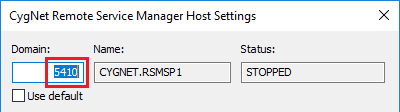
- Identify a naming scheme for all redundant RSMs in your redundancy environment. Best practice recommends using a name that identifies the network / data center / host in the RSM name, for example, XXX.RSM_NDH, where N denotes the network, D denotes the data center, and H denotes the host.
- Identify a naming scheme for all the non-redundant RSM and ARS services. You'll need one RSM / ARS pair per host, and one per potential domain. Best practice recommends using a name that identifies the data center / host / ordinal, for example, XXX.RSMDH1, where D denotes the data center, H denotes the host, and 1 denotes the ordinal.
- The ordinal is recommended because you cannot have two RSMs with the same name in one instance of the CygNet Host Manager. The lack of underscore is to separate the redundant from non-redundant RSM services.
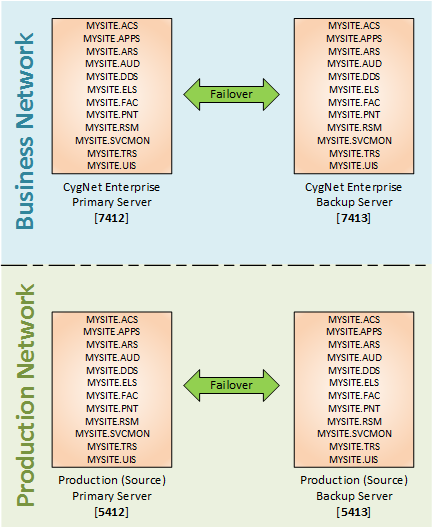
- Design your environment. Identify the Primary Active Server and the Backup Standby Server redundant pairs in your system. Draw a schematic diagram of your CygNet environment to identify all sites, domains, replicating services, desired failover relationships, etc. This will help as you configure redundancy.
- Apply your naming convention. Apply the naming convention to the sites and services in the schematic diagram.
Note the following when setting up your services:
|
|
- Update the service configuration file keywords. Use the CygNet Config File Manager to apply mass changes to multiple services. CygNet Redundancy operates on top of the CygNet Replication model and is supported by underlying replication functionality. While replication is turned off for all participating services in a redundancy environment (REPL_SOURCE=FALSE), the application does require the configuration of some of the other replication keywords (REPL_CHECK_INTERVAL and REPL_DELAY_MAX). The REDUNDANT keyword turns redundancy on for each service.
- Set the REDUNDANT keyword to TRUE to enable redundancy for all redundant services to indicate each is in a redundant relationship with another service of the same type within the redundancy environment.
- Set the REPL_CHECK_INTERVAL keyword to 10 or other meaningful value.
- Set the REPL_DELAY_MAX keyword and set to 30 or other meaningful value.
- Disable the REPL_SOURCE keyword.
- Set the WAIT_TIME_FOR_FIRST_SYNC keyword to 30, and then adjust as needed.
- Consider changing the associated AUD and ELS keywords for each RSM to be domain specific.
- Install and configure non-redundant services.
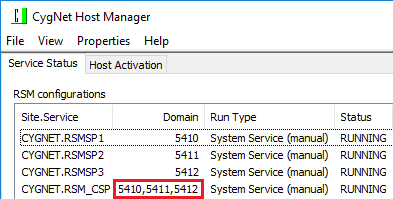
- Add an additional RSM/ARS pair to each host per potential domain. At minimum, this is for the two domains in the redundant pair. On a control network, this also includes the primary domain from the opposing data center.
- Configure one ARS to be the license master per domain. We recommend that you set this for the ARS services on the primary host.
- Consider changing the associated AUD and ELS keywords for each RSM to be domain specific.
|
|
- Configure a Bastion Host. Consider running a non-redundant bastion host to monitor all sites in the redundancy environment. Install CygNet on the bastion host without any special redundancy configurations. Configure the following services:
- A shared AUD/ELS service for all RSM/ARS services, providing complete failover history in one place, otherwise audit and event records would be lost on most domains when they failover.
- A GNS to send notifications during failover. You can’t send notifications through a GNS that is failing over.
- A BSS to host Redundancy dashboard screens. If your screens are hosted in a redundant BSS, you can’t load new pages during a failover.
- A SVCMON for redundant domains
- Create a Redundancy Definition. Use the CygNet Redundancy Editor to define the redundant relationships between service sets. Redundancy definitions are stored in the redundancydefs.db data file in the RSM directory. Verify all services are running on their expected domain, especially the ARS. If not, you may have firewall issues between hosts. Pick any redundant RSM in the control network to configure for redundancy. The redundancy definition includes the following elements:
- Network — specify the names of the networks that will contain the failover sets. Examples might include production, business, or test networks
- Domain — identify the domains in your redundancy environment, the networks to which they belong, and the role each domain plays: Active, Local Standby, or Data-Center Standby
- Zone — specify the active (main) and standby (backup) zones running one or more redundant RSMs all operating on a single domain
- Auto-failover — specify auto-failover triggers for remote and local service recovery:
- Remote recovery — specify the failover triggers that will be used to initiate an automatic failover. The Standby RSM(s) in the redundancy environment will monitor the Active RSM(s) for failure. If one or more Active RSMs become unavailable, the Standby RSM will initiate a failover.
- Local Recovery — specify the local automatic service recovery options for all services in the redundancy environment. The Failover action is used to trigger a failover and restart any failed local service.
|
|
- Perform Failover. Use a tool such as the CygNet Redundancy Dashboard to visualize your failover sets, review replication status, and execute failover, once Failover Readiness is achieved. Customize the CygNet Redundancy Dashboard to match your system. We recommend that you customize the checks to verify a host is ready to run a service on the active domain. With the dashboard you can:
- Monitor failover readiness
- Monitor replication status
- Manually failover one or more services
- Monitor a failover
- View failover history
You can also execute failover via script using the CygNet API (CygNet.API.ServiceManager).
- Validate/Troubleshoot.
- Use the RSM Diagnostics Tool to verify the consistency of redundancy definitions, as well as services and their owners across RSMs in a redundancy environment. The tool will tell you if your RSM services have properly synced. It does not attempt to fix configuration errors.
- If an RSM is incorrectly listed as owning a service, add the service back to the RSM in CygNet Explorer, then remove it.
- If an RSM that no longer exists is listed as owning a service, add the RSM name back into a zone, then wait a bit, and remove it.
More:
 Redundancy Configuration Keywords


